TearOff Today - Understanding Cognitive Modes
Every single day can feel different. One day, you wake up ready to take the world on and the next even getting out of bed seems impossible. Most task management or To-do apps really don't care about that. They were built around engagement and metrics and gamification. If you don't finish your list, your forest will die! Why do you hate trees so much! MONSTER!
TearOff intentionally avoided these mechanics because they can be stressful to the user and an app like this should meet you where you are.
How TearOff Treats other days
Instead of gamifying your life, TearOff treats your stack as an immutable list that can be viewed differently each day. The morning check-in is the start, if you choose 'Time-blindess', the app will respond to this and show your tasks differently. Visible timers will show up on your tasks and when you finish a task, you'll be shown a transition screen to decompress before you take on something else. The same applies to Reduced Cognition days, the app will simplify the UI and prompt you to select fewer tasks knowing that you're already running low on spoons.
Same Tasks, Different Lens
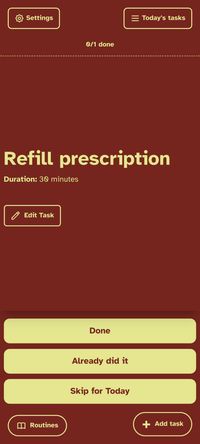
If you were to create a simple task like "Refill Prescription" and said it usually takes about 30 minutes to do, TearOff will create that task for but will display it differently depending on the day you're having.
Really Bad Day Mode
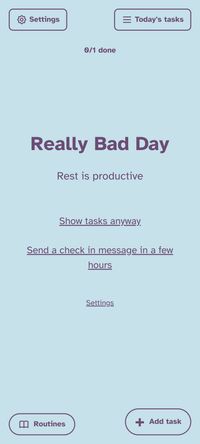
It's a real thing. They happen and they suck. When you change TearOff's cognitive mode to Really Bad Day, everything in the app goes to sleep. No timers, no notifications, nothing but a simple screen telling you that Rest is productive. Your tasks aren't gone, they're resting - just as you are. No streaks will be broken, your forest won't die, the app won't pester you for attention. Everything pauses. And everything will still be waiting for you once you're ready.
Time-Blindness Mode
The worst. Just the worst. You're full of piss and vinegar, ready to take on the day and suddenly you've just spent four hours in an utterly useless rabbit hole. Things got missed. You didn't realize it. But you were so ready to do that thing you needed to do! What happened!?!
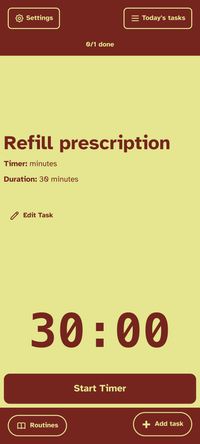
TearOff will change how your tasks behave when you select Time-Blindness. Timers will be enforced. If you didn't set a timer but gave the task an estimated duration, that estimate will be your timer. When you finish a task in this mode, TearOff will display a transition screen to give you a moment to pause. If you're ready for the next task, dismiss the transition and get going!
Reduced Cognition Mode
It comes in many forms. Sometimes you're just exhausted. Sometimes it's Brain Fog. Sometimes everything hurts so much you can't even focus. In this mode, TearOff will prompt you to reduce the number of tasks you want to commit to for that day. The interface will become less cluttered. Larger fonts, timers supressed, longer undo windows and less animations. You'll just see the bare minimum.
Reduced Sensory
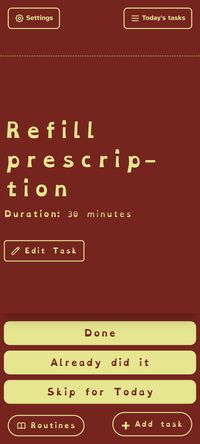
Everything has gone to hell but you still need to get a few tasks done. In this mode, TearOff changes to a dyslexic friendly font that is easier to read, quiet mode is enforced and all animations are gone. And remember, even when a task is in front of you, you can always choose "Skip for Today" and worry about it tomorrow.
Cognitive Modes are here to help
Keep you task stack the same. Let TearOff handle how to show it to you. And this modes are prescriptive, you can still change any setting you want in any mode you want. Only the things you need to do stay the same.